Design guidelines — prefab timber apartments
Design
Guidelines
How to design economic, buildable apartment projects with the Sustainer system. The possibilities of the system grow continuously — and so do these guidelines.
v03 · 12-05-2026
The building block
A first perspective on Sustainer's .home apartment module.
This is V6.1 — the latest state of the system's development.
Strip it back a layer at a time with the arrows below, or hover a part to read what it is. Open the full model, every part →
Hover or tap for details · drag to look around
Layer by layer · 1 / 9
Complete cutaway
The rear walls retain their full Fermacell lining. Follow the arrows to uncover the construction.
Chapter 01 — The .home apartment module
Introducing the module
A module can be sized to fit the plan, within fixed maximum dimensions. What never changes is the structure: four LVL (or Baubuche) corner columns and an LVL beam structure carrying floor and ceiling.
- Maximum module width is 4.5 m, maximum length is 6.8 m
- Maximum width and maximum length cannot be combined in one module
- Every module stands on 4 foundation points. At ground floor those points are standardized steel anchors, onto a plinth or foundation poles; every module above stands on the columns of the module below it
- Standard steel connections link modules, cores, corridors, galleries and balconies
- Longer modules (~7.5 m x ~2.6 m) are being investigated — ask us!
Size the module
Set the module with the sliders and drag all the way round it. Hover or click a part — the floor, its joists, the ceiling, its beams or the facade — to read every layer it is built of, and use the buttons above it to take parts away and look inside. The handle on the right cuts a section through the module at whatever height you drag it to.
Module price at this size
€ 11,275 for the whole module
€ 534per m²
The modules and their transport — 2 of this size to a 13.6 m trailer at € 1,333 a day, which is € 30 per m² of the figure above. Facades, interior walls and installations are not in it. It is a different scope from the per-m² matrix in the process documentation, which prices the floor and ceiling with margin and surcharges — so the two figures differ on purpose, and neither is a building price.
€ Most economic size — 6.4 × 3.3 m is the sweet spot for price: the lowest €/m² in the .HOME V6 matrix this side of the red line (see chapter 02 and the process documentation).
Ask us! We are currently looking into making longer modules feasible & economic (~7.5 m × ~2.6 m).
Size the module yourself — the full build-up is in the sheets
What LVL is
Laminated veneer lumber. The log is peeled into veneers a few millimetres thick, which are then glued back together in layers under heat and pressure. A knot that would be a weak spot in a sawn beam becomes one flaw among dozens of thin layers, so the timber behaves far more predictably than the tree it came from — and can be made in long, straight, dimensionally stable pieces.
That predictability is what lets a module be engineered once and repeated: every column, beam and stud performs like the one before it. It is why the structure of a module never changes, whatever size the plan asks for.
LVL-S
Every veneer runs the length of the piece. Strongest along its length, so it spans.
In this module: the floor joists, the ceiling beams and the facade studs.
LVL-Q
Roughly one veneer in five is turned across the rest, which stiffens it sideways and keeps it from splitting.
In this module: the floor plates and the corner columns — the material chapter 04 calls LVL-C, which is Kerto-Q.
Baubuche is the same idea in beech rather than spruce. Hardwood veneers make it denser and stronger, so a column of the same size carries more — which is what a tall building needs. Where each belongs is in chapter 04.
The same column, seen on end, in both woods. Nothing about the module changes — only how much its four corners can carry.
Roof, floor and ceiling
Click one of the three marked details on the section, then move over the drawing, the layers or the materials to see how it is built up.
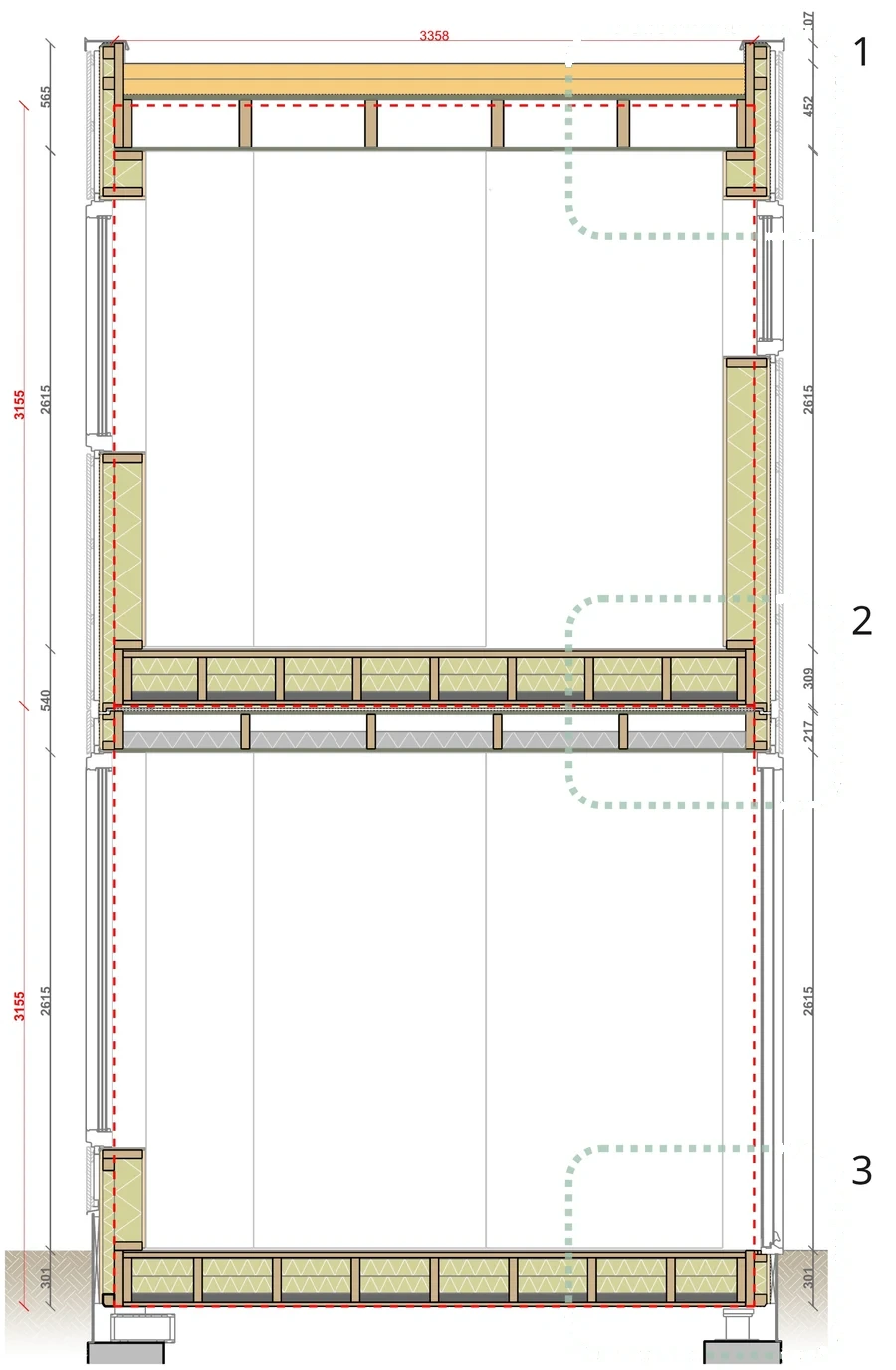
- Module width
- 3358 mm
- Floor to floor
- 3155 mm
- Clear height
- 2615 mm
2Floor between modules
Where two modules stack, the floor of the upper module sits on the ceiling of the lower one — two separate build-ups with a joint in between.
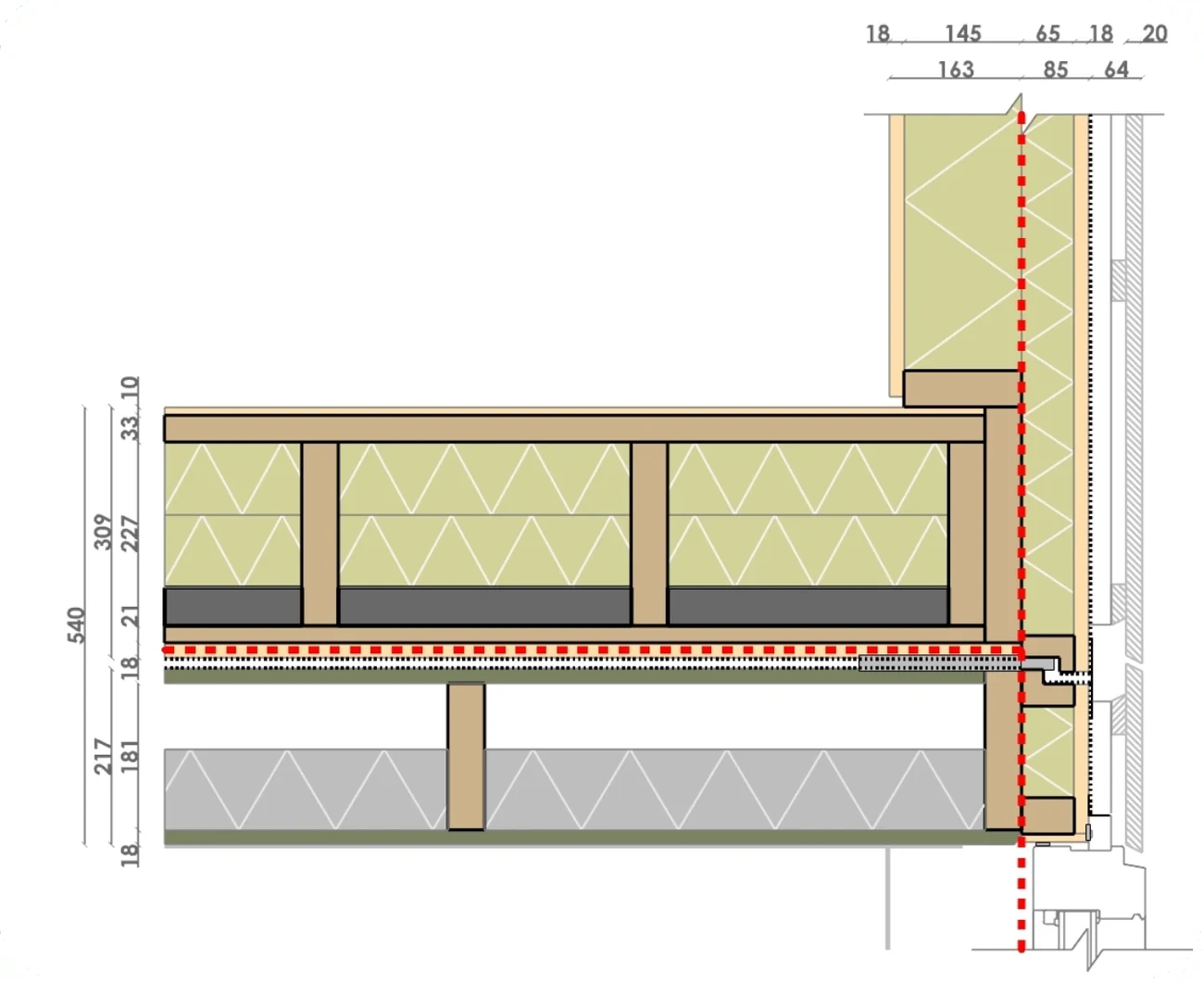
Build-up, top to bottom
Move over the bar to see the materials of each layer
- Fermacell floor board10 mm
- LVL floor top plateOptional floor heating33 mm
- LVL floor beamsCarry the floor of the module between its columns227 mm
- Floor insulation, between the beamsCellulose, mineral wool, glass wool or another insulation227 mm
- Olivijn ballastLoose mineral ballast at the foot of the beam zone, for acoustic mass47 mm
- LVL bottom plate21 mm
- Fermacell fireproofing18 mm
- Joint between the modulesThe module grid line runs here≈14 mm
- Spano top plate18 mm
- LVL ceiling beamsThe zone above the insulation stays open for ducts and wiring181 mm
- Acoustic insulation, between the beams181 mm
- Spano ceiling board18 mm
Facade wall
- Fermacell — inside18 mm
- Glass wool between the LVL studs145 mm
- Insulation — outer layer65 mm
- Fermacell — outside18 mm
- Facade folie and cavityBehind the facade cladding20 mm
- LVL 145 mm facade stud145 mm
- Facade cladding on battens—
Chapter 02 — Not all designs are economic
Towards an economic design
Economic building design is about much more than just modules — these principles help you optimize your design from the first sketch.
- Keep it simple: avoid redundant square meters
- Optimize the facade/floor-area ratio
- Galleries are often more economic than cores and corridors
- Limit setbacks and shifts in columns or modules
- Balconies are often more economic than loggias
- Copy and connect apartment plans vertically — repetition is a joy for every engineer
- Fewer modules and fewer module sizes are often better
- Aim to have all installations in 1 module
- Mind the connection to other building parts (plinth, parking garage, non-system core) — an optimal module grid can sometimes hurt your plinth column grid
All possible designs
Economic
Standard & optimized for modular
The sweet spot: repeated module sizes, aligned column grids and stacked apartment plans. This is where the system is at its most economic.
Module example: 6.4 × 3.3 m
Many designs are possible
For a modular system, the Sustainer system has a relatively wide range of applicability. As modules can have many different sizes and can be configured in many different ways, many different designs are possible. Also outside of the standard, there are options that are feasible, but demand project-specific engineering.
Not all designs are economic
Even though many designs are possible, some designs are more economic than other designs. These design guidelines help you to optimize your design.
From standard & optimized (economic) to non-standard but feasible (premium)
A smooth design process
A design process during a tender phase can for example run in 4 rounds. Each one has the same shape — someone designs, Sustainer checks — so the design comes back to us 4 times before anyone prices it.
Grid
- Architect
Grid design and module layout based on program of requirements, site conditions, client wishes and design guidelines
- Sustainer
Feedback
- Architect
Layout
- Architect
Apartment interior layout
- Sustainer
Feedback
- Architect
Services and stability
- Installation party
HVAC and installations concept
- Sustainer
Stability and column concept and feedback
- Installation party
Tender and price
- Architect
Final tender design and output of building design metrics
- Sustainer
From metrics to cost calculation
- Architect
Every step back to Sustainer is a check, not a delay — the earlier a grid or a column lands, the less the design has to move later.
Chapter 03 — Straightforward configurations win
Configure the optimal apartment plan
All configurations are technically possible, but as a plan becomes more complex, column alignment, stability and installation infrastructure become bigger challenges that cost more to solve.
- Repeat module sizes wherever possible
- Align columns in clear grids
- Repeat apartment plans vertically and horizontally
- Corridors and cores can be (prefab) concrete, CLT or the Sustainer system — discuss Sustainer-system cores with us
- Include the 32 mm cavity between apartments in the building design; module sizes are indicated without it
- A separation wall consists of 2 parts on either side of the cavity and sits at the edge between two modules
Draw a plan in the configurator
The configurator, live in the page: set out the modules with a corridor, gallery or core and read the plan's numbers as you go.
Stack your own elevation
Click the cells to add or remove modules in this front view — watch how economic your layout is.
Repeated, aligned modules in a clean rectangle — the most economic plan.
Example floorplans
Real configurations from the guidelines — slide from most economic to most expensive.
Standard & optimized for modular: repeated module sizes, clear column grids, stacked apartment plans.
Green = economic, yellow = more complex: the shade indicates economic favorability
Chapter 04 — Most important rule: columns always align
Stacking modules
The higher a building, the bigger the loads on the columns. Column size and material — LVL-C or Baubuche hardwood — take on the increasing loads.
- Columns always align — continuous towards the bottom
- Up to 6 layers (excl. plinth) without a core; up to 12 layers with the added stability of a structural core
- Column sizes increase when building more layers
- Pick a column strategy: Repetition, Parametric or Hybrid — for a tender/sketch phase usually Repetition
- LVL-C is the standard choice for low-to-medium-rise; Baubuche for high-rise or heavy loads
- Reserve space for 2 additional fire-protective layers of gypsum (2 x 18 mm) around columns — they give the column its fire resistance
- A setback is a full module; cantilevers over the module short side need extra bracing
Column size table
| Layers | LVL-C (KertoQ) | Baubuche |
|---|---|---|
| 3 | 145 | 145 |
| 4 | 150–180 | 145 |
| 5 | 160–190 | 145 |
| 7 | 180–220 | 145–170 |
| 12* | 210–250 | 160–190 |
Square sizes in mm, excluding ~36 mm fireproof plating. * Above 10 layers, additional stability needs to be researched.
How high can you go?
Up to 6 layers (excl. plinth) without a core — up to 12 layers with the added stability of a structural core, in concrete or in CLT. Drag to rotate.
Picking the right column size and column strategy
A column's size follows its load: its position in plan and in section, the module size and the stability concept.
Choose the column material
All 7 layers at 220 mm — one column type.
More than 6 layers needs a structural (non-Sustainer) core.
- Column types
- 1
- Biggest column
- 220 mm
- Space to reserve
- 256 mm
Space to reserve includes 2 × 18 mm gypsum plating — the column's fire protection.
Columns per layer
Move over a layer to see what its columns carry.
Diving deeper into column sizes and building heights
Where a column stands counts as much as how high the building is: in the facade, freestanding where 4 modules meet, or in the separation wall where 2 modules meet. Pick a building height to see the columns grow — all plans are drawn at the same scale.
Building layers
01 · 3 layers
Column in facade
- LVL column
- 145 × 145 mm
- With plating
- 181 × 181 mm
The smallest column: 145 mm.
Sizes in mm.
Modular options
Sections A-A: aligned columns work, unaligned columns are not possible
Chapter 05 — Building volume examples
Build your own building volume
Adding layers of complexity to a modular setup has almost endless possibilities — as long as the column grids stay structurally aligned and cores provide stability.
- Stack modules up to 12 storeys
- From 7 storeys a core is required for stability — it follows the building height
- Keep the column grids structurally aligned, however complex the volume
- Sustainer supports the optimization of module placement and provides an initial structural advice
Try it yourself
Click a tile to stack modules and drag to rotate. Leave tiles empty to shape an L, a wing or a courtyard. The core (grey) can go anywhere on the footprint and follows the building height.
Module size (length × width)
Grid size (modules)
Footprint · top view
32,000 mm
Grid 5 × 4 modules of 6,400 × 3,300 mm = 32,000 × 13,200 mm · built on 5 × 4 = 32,000 × 13,200 mm
Each tile is one module footprint; the number is how many floors are stacked there. Click past 12 to clear a tile.
Price difference for 78 modules
Floor + ceiling cost compared to the same stack in 6.4 × 3.3 m modules (.HOME V6 price matrix)
| Module | Per module | Total GFA | Extra / m² | Extra in total | |
|---|---|---|---|---|---|
| 6.0 × 3.6 mcolumn over 145 mm | 21.6 m² | 1,685 m² | −€10 | −€16,848 | |
| 6.4 × 3.4 mcolumn over 145 mm | 21.8 m² | 1,697 m² | −€4 | −€6,789 | |
| 6.4 × 3.3 m★ most economic | 21.1 m² | 1,647 m² | — | optimum | |
| 6.2 × 3.3 m | 20.5 m² | 1,596 m² | +€1 | +€1,596 | |
| 6.0 × 3.3 m | 19.8 m² | 1,544 m² | +€2 | +€3,089 | |
| 6.4 × 3.0 m | 19.2 m² | 1,498 m² | +€4 | +€5,990 | |
| 6.4 × 3.2 mBaubuche main beams | 20.5 m² | 1,597 m² | +€6 | +€9,585 | |
| 5.4 × 3.3 m | 17.8 m² | 1,390 m² | +€10 | +€13,900 | |
| 6.8 × 3.3 mbeyond the red line · column over 145 mm · Baubuche main beams | 22.4 m² | 1,750 m² | +€34 | +€59,511 |
Indicative only: GFA here counts module floor area only, and the €/m² comes from the .HOME V6 price matrix — the floor and ceiling of the module incl. margin, columns and surcharges, not a building price. A size priced under the optimum buys that with the letters next to it. Click a row to build with that module.
Building volume examples: from a simple block to setbacks, wings and a core
Chapter 06 — Facade, interior, separation
Most common wall types
The most used wall types in a Sustainer project: facade walls, interior walls with optional stability function, separation walls between apartments and division walls on the corridor side.
- For tender designs, assume all interior walls at 100 mm — optimize in later phases
- Interior walls parallel to a module border: place 20 mm from the border so doors can be placed prefab
- Interior walls can never sit on a module border, except when crossing it perpendicularly
- A separation wall is an acoustic and fire-safe barrier between 2 apartments
- A separation wall is always placed on the border of 2 modules — 2 wall segments with a 32 mm cavity
- The Basic separation wall is used most often; other types add stability when needed
Wall types
Move over the floor plan — the black dots mark the wall types. Click an interior or separation wall dot to see its options.
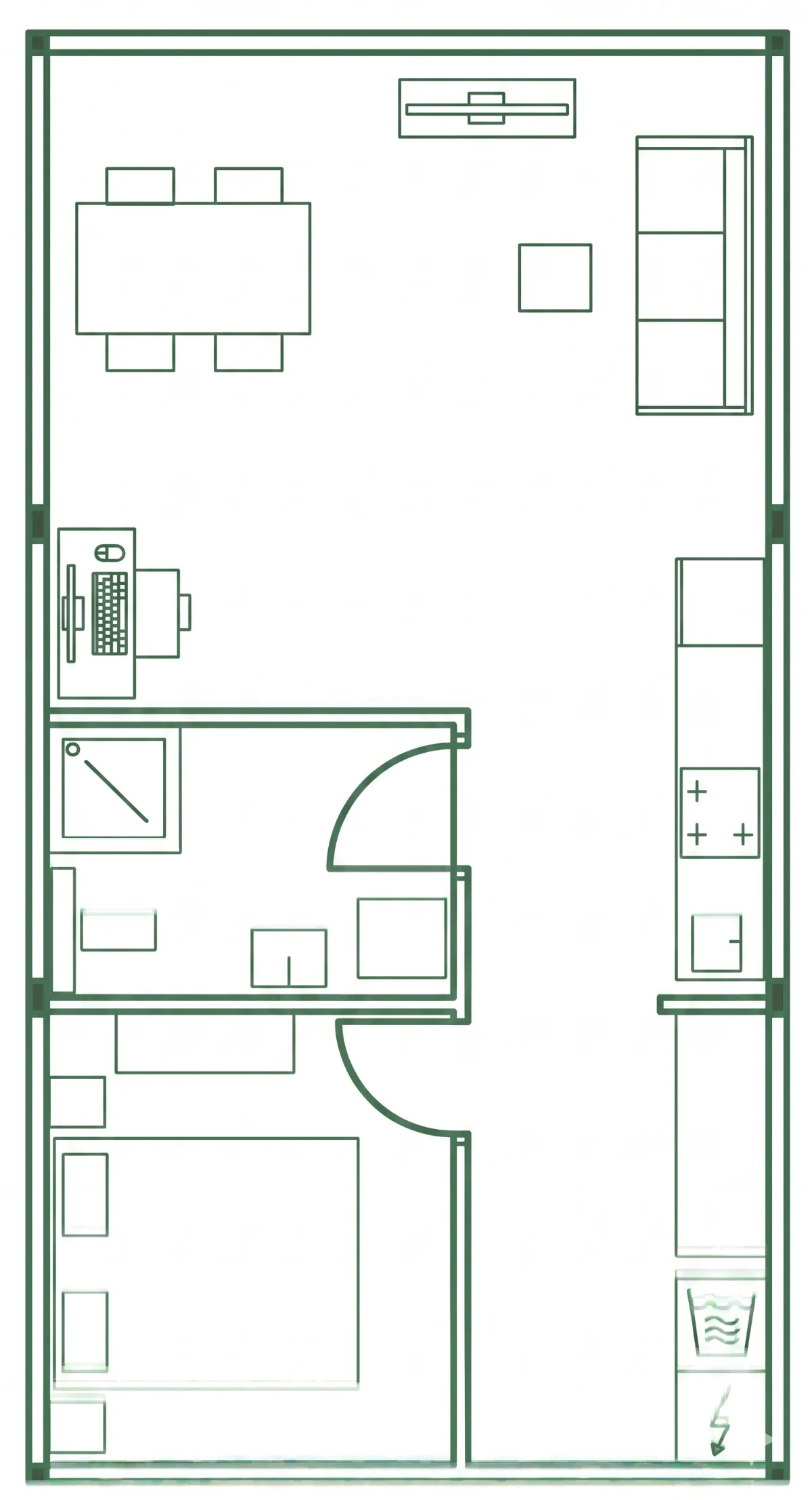
Principles
- For designing in tenders: all interior walls could be for example 100 mm, optimization can be done in later phases.
- In the sheets you can see the different interior walls applied in practice.
Interior walls
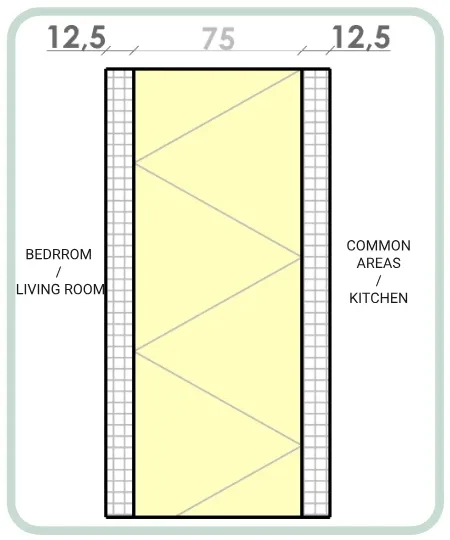
12,5 mm gypsum board · 75 mm LVL studs + insulation · 12,5 mm gypsum board
Bedroom / living room ↔ common areas / kitchen
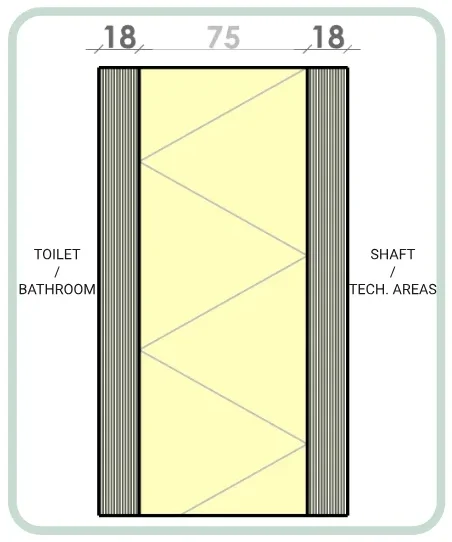
18 mm SPANO · 75 mm LVL studs + insulation · 18 mm SPANO (FERM for shafts)
Toilet / bathroom ↔ shaft / tech areas
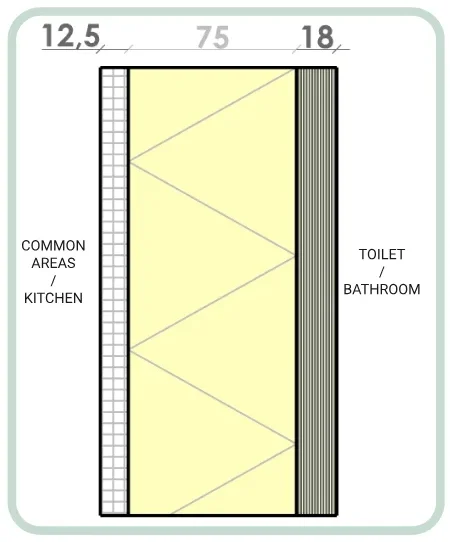
12,5 mm gypsum board · 75 mm LVL studs + insulation · 18 mm SPANO
Common areas / kitchen ↔ toilet / bathroom
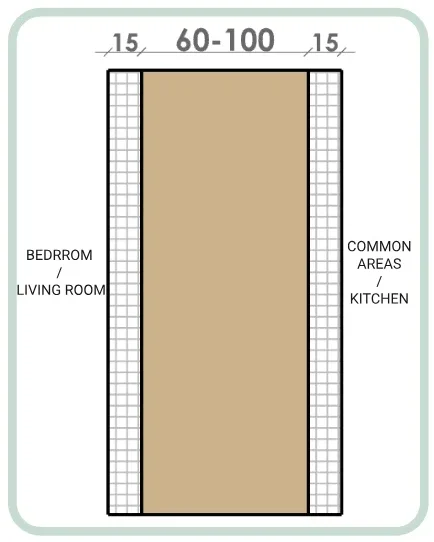
15 mm gypsum fireboard · 60–100 mm LVL block · 15 mm gypsum fireboard
Where a stability wall is needed
For certain projects the 75 mm LVL can be 63 mm LVL / insulation.
Separation walls
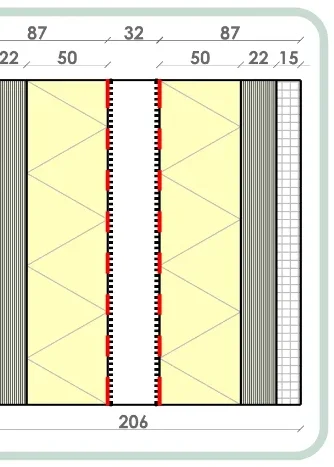
Most often used — the default
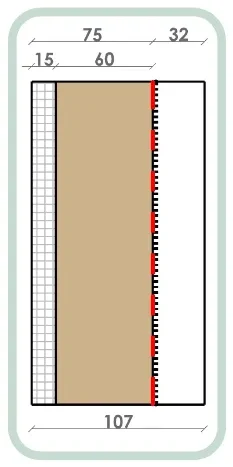
Slim option
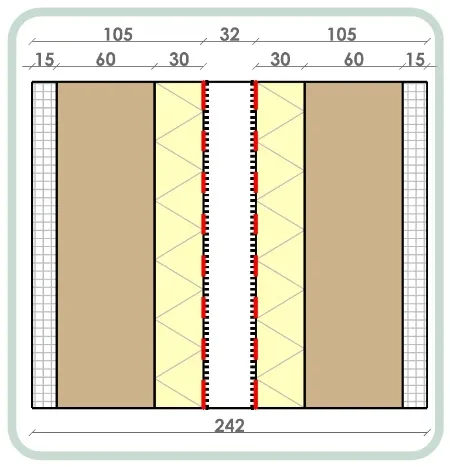
Extra acoustic performance
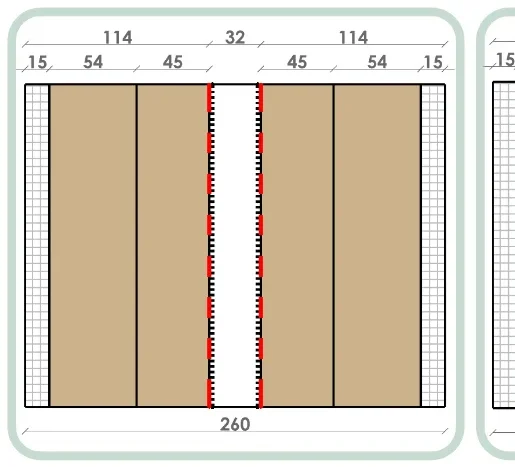
Extra stability
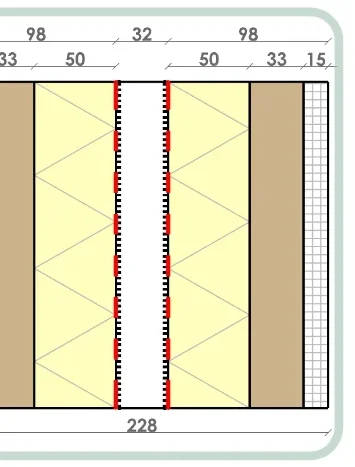
Extra stability
An acoustic and fire-safe barrier between two apartments — the Basic wall is used most; the others add stability or acoustics.
Chapter 07 — Damp-open, 312 mm, freely placed openings
Facades and windows
The facade is made of LVL studs and fermacell boards and supports different finishings. Windows can be placed freely — as long as the minimum distances are respected.
- Total facade thickness is 312 mm including timber cladding; the interior part is 158 mm
- Thermal performance: 0.181 W/m²K (0.35 W/m²K including thermal bridges)
- Diverse facade thicknesses available on request to optimize the Rc-value
- Windows and doors are openings — their influence on the Rc-value is calculated per project
- Openings must respect minimum distances to columns, floors and ceilings
- Openings cannot be placed closer than 91 mm to each other
Facade build-up in section: fermacell, LVL, insulation, cladding
Facade finishes on the module
The standard product options, each one laid on the same module so they can be compared rather than imagined. Pick a finish to see it and what it is.
01 / 9 · €
Thermally modified spruce
Unlacquered
- Origin
- Scandinavia
- Material
- Spruce
- Certification
- FSC
- Laid
- Vertical, vertical and horizontal, or a wild bond
Cladding sits on battens outside the 267 mm facade build-up, which is what takes the facade to 312 mm. The finish does not change the structure behind it.
Gevelafwerkingen — Sustainer standaard productopties. Price bands are the document's own: € to €€€, relative to each other rather than a rate.
Facade and window details
Pick one of the four details, then move over the drawing, the layers or the materials to see how it is built up. In the plan details the outside of the facade is at the bottom.
1Two modules at the facade
Where two modules meet, each brings its own 145 × 145 mm column and its own facade. An interior wall runs back from the joint; the outside of the facade is at the bottom of the drawing.
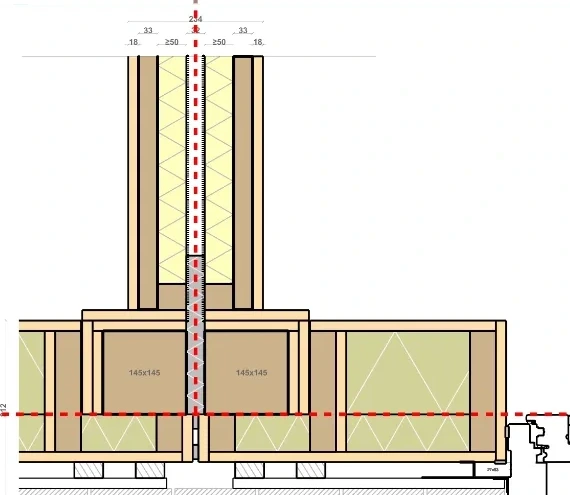
Build-up, top to bottom
Move over the bar to see the materials of each layer
- Fermacell — inside18 mm
- LVL corner columns145 × 145 mm, one per module at the joint145 mm
- LVL 145 mm facade stud145 mm
- Glass wool between the LVL studs210 mm
- Fermacell lining the column pockets18 mm
- Fermacell — outside18 mm
Interior wall
- Fermacell — both faces18 mm
- LVL studs and rails—
- Insulation between the studs—
Chapter 08 — Engineered elsewhere, connected as standard
Balconies
Balconies are not included in the Sustainer system and should be engineered elsewhere — but the balcony connections are Sustainer standard.
- A balcony must span column-to-column; spans that miss the columns are not possible
- Braces can be semi-high or hidden in floor-high panels
- Typical balconies are up to 7 m², with a depth of 1.9 m from the facade
- The balcony length can vary, provided it is supported at every column location
- An intermediate column is placed when a balcony ends midway a module
Green = possible, red = not possible: balcony options and non-options
Chapter 09 — Basic, water retention, terrace
Roof options
In developmentDifferent roof options are available: the basic roof, a build-up with water retention layer, and a roof terrace.
- Basic Roof — the standard build-up
- Water Retention Layer — for water buffering requirements
- Roof Terrace — without water retention layer
The basic roof and terrace build-ups in section
Chapter 10 — Cluster everything in one tech module
Technical installations and wet spaces
In developmentThe positioning of bathroom, kitchen and tech space — and the spatial reservations for them — is extremely important for the overall pricing of the project and the ease of the design.
- Prefab optimization: everything prepared in the factory is cheaper — avoid duct connections between modules on site
- Account for the fixed heights of floor and ceiling packages for piping, wiring and installations
- Cluster wet cells, technical rooms, kitchens and shafts into a single "tech module"
- Mount appliances preferably on interior walls, not on the facade or separation walls
- Kitchen < 4 m from the tech space; toilet < 4 m from the shaft
- Shaft and meter cupboard positions must respect beams, columns and foundation, to avoid conflicts in the structure
- Everything needs to be confirmed by the installation advisor
This setup for the module tech cluster is preferred because the shaft connections are close together. That makes the unit cheaper than if the shafts sat on opposite sides of it.
The preferred module tech cluster: tech space, bathroom, toilet and fuseboard together
Where the installations go through
Open full screen →This is the V6.1 module exactly as it is modelled, every part included, with the installations shown in red. Pipes, ducts and cables leave the tech cluster through the floor and ceiling cassettes and the walls, and every pass is a hole that has to be cut in a CNC element — an LVL beam or plate, the Spano deck, a Fermacell lining. The model is read around those holes: one example of each type of penetration, so you can see what goes through what, and how big the opening is.
Only the elements that are actually cut are shown by default — fixings, foil, insulation and cladding stay off until you tick show every layer.
- 1Pick a penetration. Use ‹ › under the model, the arrow keys, or click any red part.
- 2The view lands on the hole. The element it passes through turns see-through; drag to turn around the hole, scroll to zoom once you have clicked the model.
- 3Fade the installation. Click the red part (or press H) and it becomes a faint ghost, so the actual cut-out is what you see.
Loading the module
Every part as modelled · 16 MB
0%